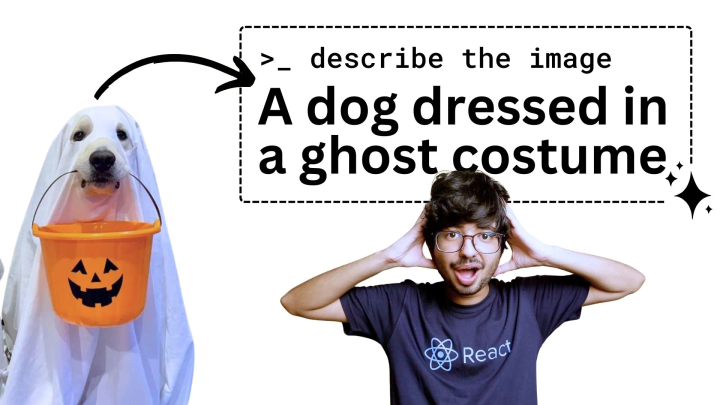
At the end of this article, you will learn how to build an image alt text generator and you would have learnt:
- What is Amazon Bedrock
- Cost of using different models on Bedrock
- How to request access to bedrock models
- How to use them in AWS console directly
- What are the input parameters for bedrock
- How to integrate Bedrock AWS SDK in NodeJS
- How to read files in NodeJS as base64 with FS
- How to send files (images, docs, csv) to Bedrock LLMs
What is Amazon Bedrock
With the rise of Gen AI, AWS launched a new service which would allow you to talk to tons of AI models using the same API and SDK.
AWS has even own models Titan and Nova including 3rd party models.
You don’t need to setup any deployment to start using these Serverless models, you just request access to the Models you’d want to use and then start using them with Bedrock AWS SDK.
Serverless models list
This is the list for some of the popular Gen AI models, in total there are 47 models available as of Jan 2025.
| Model Name | Provider |
|---|---|
| Claude 3.5 Haiku | Anthropic |
| Claude 3.5 Sonnet v2 | Anthropic |
| Claude 3.5 Sonnet | Anthropic |
| Claude Instant | Anthropic |
| Nova Canvas | Amazon |
| Nova Lite | Amazon |
| Nova Micro | Amazon |
| Nova Pro | Amazon |
| Nova Reel | Amazon |
| SDXL 1.0 | Stability AI |
| Llama 3.3 70B Instruct | Meta |
| Llama 3.2 11B Vision Instruct | Meta |
| Llama 3.2 90B Vision Instruct | Meta |
Bedrock Pricing
You only pay for the tokens used, nothing else.
| Nova models | Price / 1,000 input tokens | Price / 1,000 output tokens |
|---|---|---|
| Nova Micro | $0.000035 | $0.00014 |
| Nova Lite | $0.00006 | $0.00024 |
| Nova Pro | $0.0008 | $0.0032 |
View the complete pricing on AWS Bedrock pricing page.
Example pricing
Using Amazon Nova Lite to generate an image alt text would cost $0.00036.
2,000 input tokens = $0.00006 x 2 = $0.00012 1,000 output tokens = $0.00024 x 1 = $0.00024 Total cost = $0.00036 per image
You can generate alt texts for 2,777 images in $1.
Request Model Access
Before we jump in, we need to get our hands on the AI models which we want to use. You don’t need a driver’s licence to get access to Amazon models.
Go to Amazon Bedrock Model access page and select Nova Lite and click on Next

Read the terms and click on Submit.

You’ll get access to Amazon models instantly (unless you have not paid your AWS bills).
Use Bedrock in AWS Console
You can try different models from Bedrock Playground itself.

Prompt configuration
Randomness and diversity
Temperature: Randomness (Creative responses) Top P: Most probable answer
Reducing these number decreases hallucination (fluff).
Response Length
Maximum number of characters (tokens) you want the AI to reply in.
Prompt for image alt text generation
If we wanted to generate an alt text for the image, your prompt should look like this:
Describe the image (objects and text) this is for alt text. Just write the text in one phrase
Result
This is the response we get from Nova Lite:
A dog is sitting on a stool with a fan behind it and the word “ENV” written in white on a purple background.
Find Bedrock Model ID
You can visit Bedrock model catalog to get the model ID and API request format.

Bedrock with NodeJS
System requirements
- AWS CLI (Installation & Setup guide)
- NodeJS
Initialise a NodeJS project
Create a directory and initialise package.json
mkdir img-alt-gen
cd img-alt-gen
npm init -y
Install bedrock runtime
Use your package manager (bun, npm, yarn) to install the Bedrock SDK:
pnpm i @aws-sdk/client-bedrock-runtime
Use Bedrock runtime client
Here are the steps to get started
- Create JavaScript or TypeScript file i.e.
index.js,index.ts - Import
BedrockRuntimeClientandInvokeModelCommandfromaws-sdk - Initialise bedrock runtime client
- Create model input with the prompt (body)
- Create
InvokeModelCommandby passing stringified body and model id - Use bedrock client to send the command
- Convert buffer into string
- Parse JSON from the string
JavaScript Code
This code encodes the input prompt and decodes the output from AI (Nova Bedrock) and then logs everything in the CLI.
import {
  BedrockRuntimeClient,
  InvokeModelCommand,
} from "@aws-sdk/client-bedrock-runtime";

const brockClient = new BedrockRuntimeClient({});

const prompt = "How old is earth? just tell the number & unit";

const modelInput = {
  messages: [
    {
      role: "user",
      content: [
        {
          text: prompt,
        },
      ],
    },
  ],
};

const modelCmd = new InvokeModelCommand({
  modelId: "amazon.nova-lite-v1:0",
  body: JSON.stringify(modelInput),
});

const res = await brockClient.send(modelCmd);
// Convert Bedrock response buffer to string
const jsonRes = Buffer.from(res.body).toString("utf8");

console.dir(JSON.parse(jsonRes), { depth: null });
Run your script with node or tsx:
node index.js
Response output format
You will see your answer inside messages in content array object.
{
  output: {
    message: {
		content: [ {
			text: '4.54 billion years' // <-the answer
		} ],
	    role: 'assistant'
	}
  },
  stopReason: 'end_turn',
  usage: { inputTokens: 12, outputTokens: 7, totalTokens: 19 }
}
We also get to know:
- How many tokens were used
- What was the reason to stop
Send Images to Bedrock
We need to send images as base64.
How do we do that?
- Read the image using
readFilefromfs/promisesinbase64 - Add another item in the content array which is image with the format and source
- Modify the prompt with
Describe the image
Code changes for sending image to Bedrock:
import { readFile } from "fs/promises";

const base64Img = await readFile("./dog-in-costume.jpg", "base64");

const prompt =
  "Describe the image (objects and text) this is for alt text. Just write the text in one phrase";


const modelInput = {
  messages: [
    {
      role: "user",
      content: [
        {
          image: {
            format: "jpeg",
            source: { bytes: base64Img },
          },
        },
        {
          text: prompt,
        },
      ],
    },
  ],
};
Image analysis output
Now when we run the program again we see the output:
Two dogs dressed in ghost costumes are standing next to each other.

Now you know how to use Amazon Bedrock! Happy hacking :)